We respect your privacy


























Do you know that feeling when you are doing something in the garden, you left your phone somewhere in the house, and at that exact moment a booking arrives? Of course, you only notice it two or three hours later, and a cold sweat runs over you because an overbooking could have happened at that very moment.
After a situation like this, you decide to always carry your phone with you everywhere, just in case, but then a booking arrives through one of the platforms and the app fails to send you a notification. You only realize what happened when another booking for the same period arrives through a different channel, and you start wondering what to do now.
In fact, the real question is can all of this be prevented, and the answer is – to a large extent, yes.
What is iCal?
iCal or iCalendar is a type of medium that allows the storage and exchange of information that we record in our digital calendars. These can be business events, obligations, meetings, birthdays, but also accommodation bookings.
By connecting different advertising platforms through iCalendar, blocked dates on one platform are automatically mirrored on others connected to it, which makes business easier for us.
How to connect platforms?
iCal synchronization has become a standard, and many online advertisers enable this type of synchronization. Among them are the very popular Booking and Airbnb, so below we provide links to their instructions on how to set up synchronization:
Booking.com iCal synchronization instructions
Airbnb iCal synchronization instructions
If you have your own website for your property, the iCal synchronization feature with other channels will be useful to you. Apartmanica also enables its users to synchronize calendars via iCal on their websites with other booking platforms.
How do you connect them?
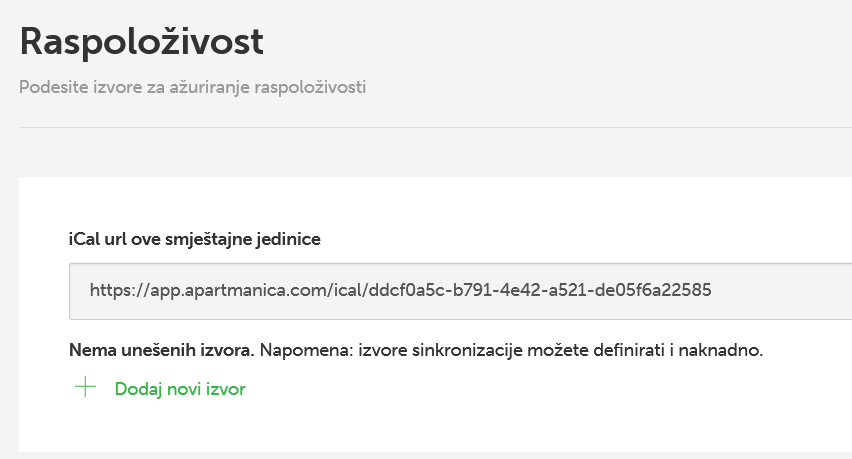
1. Take the iCal URL from your Apartmanica website
In the system of your Apartmanica website, click on editing your accommodation unit and find the Availability section. There you can take the iCal URL of your calendar.
2. Import the calendar into Booking.com
In your listing on Booking.com, find the Sync calendar option. Click on Import calendar within it and paste the iCal URL of your Apartmanica website.
3. Export the Booking.com calendar
Then click on Export your calendar and copy the URL.
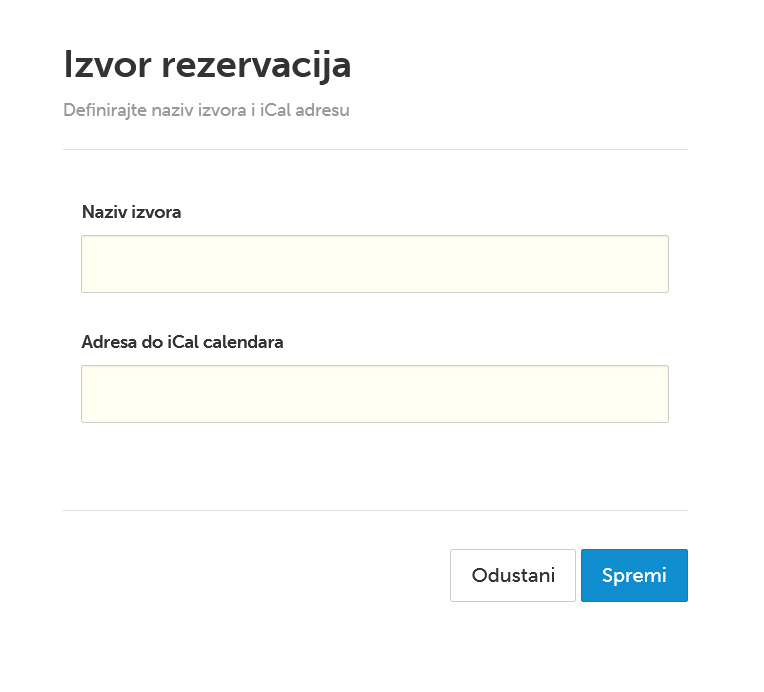
4. Add a new source in the Apartmanica system
Go back to your Apartmanica website in the Availability section and click on the green link + Add new source. A pop-up window will open where you will enter the platform name and paste the iCal URL.
On Airbnb, you will find the iCal URL under Import and Export calendar.
Is iCal synchronization a reliable method?
Synchronization of connected calendars is carried out at certain intervals and depends on each channel, that is, the platform where the calendar is located. In other words, synchronization does not happen in real time as with a channel manager.
Moreover, on some channels, checking for new entries happens only twice a day. Apartmanica is much more up to date here and does this on average every hour. We conclude that there is always a possibility of overlapping bookings if you have the Instant booking option enabled on several channels. In such situations, it is safer to use a channel manager.
However, if you have Instant booking enabled on only one platform, and on the others you receive inquiries, iCal synchronization is a sufficient option that can make your business easier.
Do you want to make your business easier?
By synchronizing all advertising channels, you reduce the likelihood of overbooking, and with your own website you save significant amounts on commissions.